+ Help - How do I use Config?
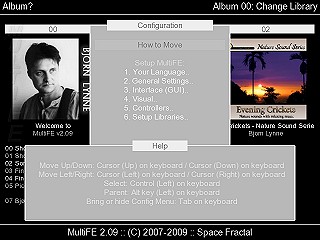
- Press TAB for bring op config, if it does not show (it should show automatic, if no music, games library is configured, or data/config.dat is missing). The TAB key can been remapped.
- On that config window, you can read how you move around in the config which is explained in the help window below.
If you want to reset MultiFE to its default settings, because might have remapped wrong or such, you can delete CONFIG.DAT from C:\Program Files\MultiFE\Data\ (as I assume you use the English version of Windows and have installed it in that default Dir).